9/14/2010
Cài Mobipocket Reader cho Nokia 6300 (Symbian v4.0)

4/06/2010
Cách cứu HP iPaq hx4700 bị lỗi Error 606 khi đang nâng cấp Rom
"ERROR 606: USB timeout communicating with the bootloader".

HP iPAQ hx4700 sẽ không thể boot và nó chỉ thể hiện màn hình bootloader screen với HP logo và chữ “Serial” hoặc ”USB” (nếu bạn cắm vào cable nối máy tính)
Dưới đây sẽ là bài viết giúp bạn khắc phục trong những trường hợp tương tự. Như vậy, bạn sẽ không phải gửi máy của bạn đến trung tâm bảo hành của HP để thay bo mạch, nhất là nếu bạn không còn bảo hành.
Bài viết dưới đây có vài điểm giống nhau ở các dòng HP khác nhau. Nhưng đừng thử nếu kĩ năng của bạn không thành thạo. Và bạn phải chắc chắn rằng lỗi của bạn giống hệt trường hợp miêu tả ở trên.
Tất cả những gì bạn cần là 1 PC với hệ điều hành MS Windows XP, một chiếc máy HP iPAQ hx4700 đã ở tình trạng hard-reset, 1 file chứa ROM image (đã được chỉnh sửa, xoá bỏ 2600 ký tự đầu tiên) và chương trình Multi-port/USB TTY.
Tải phần mềm: http://www.mediafire.com/file/imxegmjgmmu/mtty11a.exe
Tải bản rom WM2003SE (đã sửa): http://www.mediafire.com/file/nmjz4jlfmkh/win2003SE.rar
Tải bản rom WM2005 (đã sửa): http://www.mediafire.com/file/yiymgnmzdbi/win2005.rar
Bản nâng cấp ROM của HP có chứa 1 file NBF. Đây là file chứa phần tiêu đề & nội dung bản ROM image data. Bạn nên đọc bài sau tại http://www.tweaks2k2.com/portal/forum/viewtopic.php?forum=8&showtopic=61
để biết rằng đối với HP hx4700, bạn cần xóa 2600 bytes đầu tiên để có được 1 bản ROM image thô. (there should leave 64 bytes and then the text signature ECEC).
Vì vậy, nếu không có bản rom đã sửa ở trên, bạn có thể tìm file *.nbf trong gói phần mềm uprom của bạn và chỉnh sửa nó theo như hình sau.

Các bước thực hiện việc flash lại rom cho PDA:
1. Kích hoạt chế độ Bootloader mode cho HP iPAQ hx4700
Ấn nút POWER + iTASK + CONTACTS cùng lúc & giữ chúng. Sau đó chọc nhẹ Reset button ở dưới đáy và thả tất cả ra. Màn hình với HP logo ở giữa sẽ xuất hiện với "bootloader version" (ví dụ 1.01) ở bên dưới màn hình & chữ “Serial” ở bên trên. Nếu bạn nối máy với cổng USB, chữ “Serial” sẽ chuyển thành “USB”.
CẢNH BÁO: hành động này sẽ làm hard-reset máy và tất cả chương trình dữ liệu sẽ bị mất. Hãy backup nếu bạn cần chúng sau này.
2. Cắm cable nối PDA vào máy tính. Màn hình PDA sẽ có chữ USB.
3. Tắt chương trình MS ActiveSync (wcecomm.exe) trên máy tính của bạn. Dùng Ctrl+Alt+Del vào Task Manager (end process chương trình wcecomm.exe)
4. Chạy phần mềm Mtty11a.exe (Multi-port/USB TTY utility). Chọn cổng \\.\WCEUSBSH00x (chữ x có thể là bất kì số nào – ví dụ 1,2 và 3). Đừng thay đổi bất cứ thứ gì. Xem hình hướng dẫn.

6. Khi chương trình bắt đầu, gõ lệnh lnb tên_file_rom rồi ấn Enter và chờ đợi. Xem hình hướng dẫn.

Lưu ý: Tất cả các file rom đã tải về, giải nén và cho chung 1 thư mục với chương trình Mtty11a.exe.
Nội dung tham khảo:
- http://www.hx4700.net.tf/ERROR606/ (phiên bản cũ của hướng dẫn này - năm 2006)
- http://www.resco.net/forums/ShowPost.aspx?PostID=2804
- http://www.tweaks2k2.com/howto/viewtopic.php?t=60
- Nâng cấp HP hx4700 lên Windows Mobile 2005.
Về nguyên tắc, việc up rom cho các đời máy HP khác cũng tương tự, tuy nhiên mình chưa có dịp thử nghiệm.
Nếu bạn có thắc mắc hay yêu cầu trợ giúp, bạn có thể liên hệ lại với tôi. Ngoài Hp4700, tôi cũng đã up rom cho các đời máy Acer n3xx, Dell Axim x30h, 50/51v, O2 xdaII... Vì vậy, nếu gặp khó khăn trong việc up rom, bạn cũng có thể mang máy đến nhờ tôi trợ giúp.
Một vài phần mềm up lại đề phòng bạn cần mà không tìm thấy link trên mạng.
- http://www.mediafire.com/file/netm0mly4je/hx4700_11008_ENG_RC_AKU26.zip
- http://www.mediafire.com/file/k2jt2dxzizy/hx4700 MISC XIP_ENG.PPC300_2577.cab
- http://www.mediafire.com/file/k2jt2dxzizy/hx4700 Audio Driver v110.PPC300_2577.cab
5/11/2009
Cập nhật Twitter với Google Talk
- Bạn không muốn cài thêm phần mềm chỉ để Twitter.
- Máy bạn đã cài sẵn 1 chương trình chat như Google Talk/ hoặc bạn hay dùng Gmail.
- Bạn muốn kết hợp Twitter với Google Talk để cho cả thế giới biết bạn đang làm gì chỉ bằng 1 dòng lệnh.
- Đây là mẹo vặt mà bạn có thể sử dụng.
TwitterSpy gives you a mashup of XMPP (the IM protocol that Google Talk/Chat uses) and Summize data. This lets you track query strings through your IM client rather than having to refresh a tab all the time.
To get it set up in Google Chat (the IM feature with in GMail. This will work for Google Talk as well):
1. In Gmail, go to the chat sidebar and paste in twitterspy@jabber.org
2. In the popover that opens, click Invite to Chat
3. You will get another window, click Send Invites
This will generate an auto response for twitterspy and twitterspy will then become a friend that you can IM with. First thing to do is IM ‘help’ (no quotes) and you will get a list of the things you can do:
off Disable updates.
on Activate updates.
track Track a topic (summize query string)
tracks List your tracks.
untrack Stop tracking a topic
For example, if I want to create a query like the one above, I simply IM: track techlifeweb -from:techlifeweb
So glad to have at least pseudo-track back! We’ll see what happens if a Twitter/Summize merger goes forward.
Many changes have been made to TwitterSpy. Typing help:
autopost Enable or disable autopost
follow Follow a user
help Get help for commands.
lang Set your language.
leave Leave (stop following) a user
off Disable updates.
on Activate updates.
post Post a message to twitter.
search Perform a sample search (but do not track)
track Track a topic (summize query string)
tracks List your tracks.
twlogin Set your twitter username and password (use at your own risk)
twlogout Discard your twitter credentials
untrack Stop tracking a topic
watch_friends Enable or disable watching friends.
whois Find out who a particular user is.
You can then then use twlogin to log into twitter via TwitterSpy in Gtalk. Then you can post new messages to Twitter. Only slight difference at present is you need to type the word ‘post’ before you tweet. For example: post Hello World will show up in Twitter as Hello World. The command ‘post’ does not count toward your 140 character count.
The command ‘watch_friends on’ will allow you to see all your friends tweets. This is cool but things can really fly by at times.
- Add thêm twitterspy@jabber.org làm bạn trong Google Talk
- Dùng câu lệnh twlogin tên_tài_khoản_twitter mật_khẩu
- Dùng câu lệnh post Tôi yêu Twitter để gửi thông điệp lên mạng cho mọi người cùng đọc.
- Dùng câu lệnh watch_friends on để nhận được thông điệp ngay lập tức từ bạn bè.
2/20/2009
Công nghệ gian lận cho Iphone
2/18/2009
Google Sync với Windows Mobile
Thiết lập Google Sync của bạn từ thiết bị dùng Windows Mobile
Lưu ý quan trọng: Hãy chắc chắn rằng bạn đã sao lưu tất cả Danh bạ, Lịch sự kiện từ PDA sang máy tính của bạn trước khi tiếp tục.
Bắt đầu
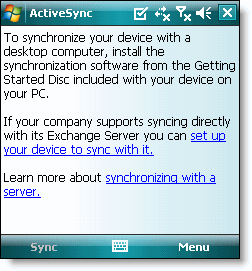
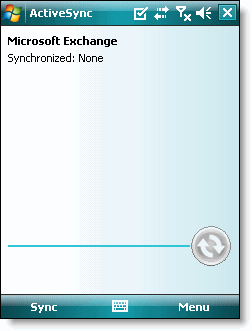
1. Mở chương trình Active Sync trên PDA của bạn.

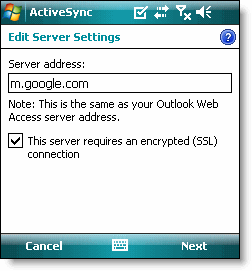
Đăng nhập vào tài khoản Google
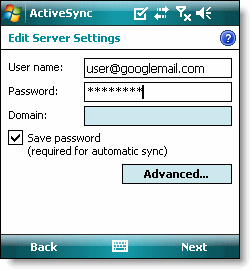
5. Bấm Tiếp theo (Next).6. Nhập đầy đủ địa chỉ email (tài khoản Google) tại mục User name (tài khoản người dùng).
7. Nhập mật khẩu tài khoản Google của bạn tại mục Password (mật khẩu).
9. Bấm Tiếp theo.
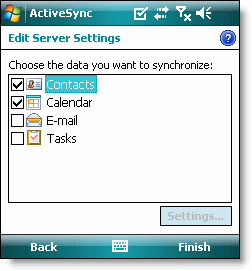
10. Chỉ chọn 2 mục Danh bạ và Lịch (Contacts, Calendar).


12. Ấn nút Sync (Đồng bộ hoá) ở menu softkey bên trái để đồng bộ hóa.

Bây giờ bạn đã cài đặt Google Sync cho các thiết bị di động dùng HĐH Windows Mobile của bạn.
Nguồn (bản Tiếng Anh): http://www.google.com/support/mobile/bin/answer.py?answer=138636&topic=14299
Dịch: Google Translate / Hiệu đính: Mr.107
2/16/2009
Hướng dẫn làm RSS feed cho bất kì trang web nào bạn muốn
7 Tools To Make An RSS Feed Of Any Website
by Michael Garrett, on September 30, 2007,
Other times, I just want a more refined feed of one category of a blog. Some blogs offer multiple RSS feeds for each category, but many do not.
This is why I have compiled a list of online web services which allow anyone to create an RSS feed of any website. Some are very simple while others are more advanced, so depending on your level of expertise, you are sure to find a tool that can help you get the custom RSS feed you are seeking.
- My personal favorite, Feed43 is definitely not for the faint of heart. With this service I had the most control over the final appearance of the feed, but I also had to take a look at the tutorial
to get an understanding of how the syntax works to create variables. If that last statement was too much for you, then this service probably is too. At least I got a well-configured feed
from my Profy articles page (which is feedless). Others have used Feed43 to create RSS feeds of MySpace comments
.
- This service is simple, but adds a small level of refining to the automatically generated feeds. After users provide the URL of the page to make a feed of, Feedity gives the option of inputting a Start and End block (HTML tags), to notify the service where each post starts and ends. This service was formerly known as FeedTier
.
- This tool is probably the simplest and the easiest to use, but it requires manual updating of the feed that you generate. Feedmarklet gives you your own RSS feed instantly, with no sign up required. Using a bookmarklet button in the browser bookmark bar, users can easily add any page to the feed quickly. Not too many features are present here.
- Dapper allows anyone to create Dapps (widgets) that track the content of any website. This can also be used to track the RSS feeds of sites that do not offer one. In terms of features, Dapper has the most diverse selection, but it does require a learning curve. Be sure to check out DapperFox
which is a Firefox extension that creates an RSS feed from any page.
- Yet another of the easy feed creation tools, this one requires nothing more than the URL of the page you wish to transform and a tag. Once the service discovers items for the feed, it is up to you to weed out the unnecessary ones, by setting the minimum and maximum number of characters in a title and by selecting the first and last news items of value. Great for beginners!
- I found Ponyfish to be perhaps the easiest to use. After users provide the URL, the service provides a small window of that address, where users must simply click on each link that is to be added to the feed. After this Ponyfish tries to determine a generic URL with your help (using “*” as wildcard symbols), in order to retrieve future items to be added to the feed automatically.
- Described as “a service that helps you monitor web sites that do not publish RSS feeds. It will check any web page for updates and deliver them to your favorite RSS aggregator.” This site offers a bookmark toolbar button that provides a quick way to generate a feed while visiting any website.Hopefully, one of these tools can help you create a customized RSS feed that suits your needs.
---------------------------------------------------
Bổ sung của Mr.107:
Đã test thử các trang web kia, 1 số do mạng chậm, 1 số do khó sử dụng nên cuối cùng chỉ có 1 trang là làm ngon lành. Đủ xài rồi.
Đây là hướng dẫn bằng hình ảnh để sử dụng trang http://www.feed43.com. Click vào hình để phóng to.
Đối tượng tạo RSS: Trang ATPVietnam.com (trang này load rất chậm do nhúng quá nhiều thứ, mà lại không có RSS). Rất tiếc vì kết cấu trang không cho phép lấy sẵn content nên chỉ có thể tạo link để click chuột thôi.
Sản phẩm: http://www.feed43.com/atpvietnam.xml
Bổ sung: Feedity.com cũng rất hay. Rất tiện cho người mới dùng, không quen ngôn ngữ HTML. Đặc biết, trang này lại hữu dụng với những website không thể dùng Feed43.com để tạo RSS. Nhược điểm, chỉ cho lưu trữ 10 RSS/tài khoản email, không tùy biến RSS được như Feed43.com
2/15/2009
Nhạc chuông yêu thích cho điện thoại di động
Thư viện sách ebook dành cho PDA
- Ti-mua và đồng đội - Arkadi Gaida
Phần mềm dành cho Symbian OS9.1 v6.0 3rd
- Hướng dẫn flash rom với firmware mới nhất cho Nokia N81 (PDF)
- Từ điển PPCLINK Lexisgoo + data (Anh - Việt , Việt - Anh, Anh - Anh)
- Nokia Multi Scanner Turns (quét dữ liệu nhờ Camera)